 |
Knowledge Base |
P I Q Member App - Wait List Bookings
|
This article will guide you through using the Wait List feature when using the PIQ Mobile App.
1. Setup Wait List Feature
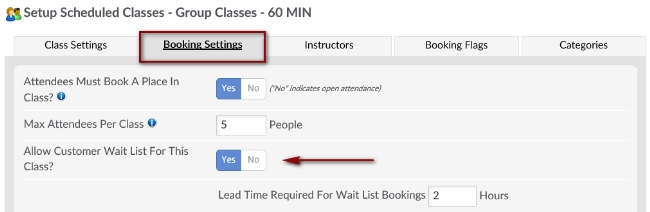
Navigate to Setup > Scheduling > Classes/Group. Click the edit pencil next to the class you wish to enable wait list. Click the Booking Settings tab and proceed to select Yes next to Allow Customer Wait List For This Class?
Enable Wait List Feature In ClubReady
2. Using Wait List Feature

Once logged into the app, click the Book Classes button to view list of available classes.

If a class is full, you will be able to select WAITLIST.
P I Q - Wait List Bookings
1. Setup Wait List Feature
Navigate to Setup > Scheduling > Classes/Group. Click the edit pencil next to the class you wish to enable wait list. Click the Booking Settings tab and proceed to select Yes next to Allow Customer Wait List For This Class?
Enable Wait List Feature In ClubReady
2. Using Wait List Feature
Once logged into the app, click the Book Classes button to view list of available classes.
If a class is full, you will be able to select WAITLIST.
    |